

NOW LIVE
Trusted California authority. A clearer path forward.
The refreshed OnLAW Pro and Practitioner experience makes it easier to search authoritative Secondary Sources, navigate practical guidance and find the resources most relevant to the work at hand.
Find the guidance you need. Understand how it fits. Move your work forward.
When your work depends on California law, finding the right authority is only part of the challenge. You also need to understand how it applies and identify the practical resources that can help you determine what to do next.
The refreshed experience creates clearer paths through CEB’s trusted California legal research and practical guidance.
When your work depends on California law, finding the right authority is only part of the challenge. You also need to understand how it applies and find the practical resources that can help you determine what to do next. The refreshed OnlawPro experience creates stronger connections and clearer paths through the legal research and practical guidance you trust to the resources most relevant and useful to the task at hand. We've made our content easier to discover, navigate, and put to use by allowing you to pinpoint relevant information within secondary source titles, find the right practitioner resource more easily, and return to your favorite tools faster. And for customers with an Onlaw Pro Plus Practitioner Unlimited subscription, your CEB insight responses will be augmented by practical perspective and further nuance. The foundation of all our improvements is the text itself. So to create a more comfortable and readable research experience, you can now control the font size and text spacing in secondary sources to suit your screen and reading preferences. You can also create your ideal balance between the table of contents and your reading area by expanding, narrowing, or closing the left navigation sidebar. Since your ideal table of contents to reading area ratio will likely differ between content types, the platform will remember your specific preferences for each content type. Don't worry about losing your place when tailoring your preferences. The content at the top of the page you are viewing will stay constant while you tinker with and optimize your legal research environment. These updates are in addition to other less prominent typography changes across our platform that will reduce the overall eye strain that comes from reading on a screen and will make our content more accessible to legal professionals with visual impairments. Moving on from configuration to content, we know that context and clarity are critically important in your work, which is why we prioritize these needs when designing this refresh. To provide clarity through visual cues, we've added in text highlights of your search terms for easy scanability. If the highlights become a distraction while you're reading, you can turn these off without clearing your search. The highlights preference checkbox exists across all content types and your preference is remembered across all content types and between searches. When viewing search results in context, we've enriched the table of contents with yellow flags that brightly identify all sections in that title that contain your search terms, along with the number of subsections where the terms can ultimately be found. This allows you to scan the left side and quickly determine where the most relevant information likely appears and go directly to the most promising sections. We further improved the in context search results experience by adding the list of title specific search results to the side panel ordered by relevance. The in text highlights, table of content flags, and title search result tab will appear when you access a title through a search result or when you access a title by browsing, then enter a search in the newly added Search Within Title box at the top of all secondary source side panels. Whether searching or browsing, to reinforce context and help you remain oriented in our content, we've added a prominent highlight that moves through the table of contents on the left as you move through the title, practitioner document, or case. Maybe less immediately noticeable, but with the aim of fostering clarity and focus, we decluttered the table of contents in our secondary sources so you only see what is in the book you are actively looking at without having to sort through other titles. You can use the practice area breadcrumb at the top to view and access the other titles in that library. For our Onlaw Pro customers, you will now see the Practitioner tab at the top of the page and within search results. Practitioner is our collection of workflows, forms, checklists, how to guides, and other practical resources. These tools are designed to complement traditional legal research by helping you understand what to do next and carry that research into the work at hand. You may now see practitioner resources that you find relevant based on their title, which workflows they are part of, and or the text preview containing your search terms. However, your ability to open and use that content still depends on your subscription, which has not changed with this update. The greater visibility is intended to help you understand what the resource contains and how it relates to your research. If it addresses a need in your practice, we can help you explore whether practitioner would be a useful addition. Whether or not your plan includes practitioner content, seeing which workflow or workflows include a specific document while searching or browsing allows you to understand how the resource fits within the larger legal task and helps you discover related guidance. If your plan includes practitioner content, you'll notice and encounter the broadest set of improvements, including the refreshed practitioner experience designed to make the path to this valuable content more intuitive and seamless. The practitioner landing page has been reconfigured so you can view as much or as little of your accessible content as you'd like. Once you click into a practice area subtopic, you'll see more of your available resources right away. We've also added a flag to let you know when a resource has been recently added or updated. To distill the available subtopic guidance down to only the most relevant resources, you can filter your view by subcategory and or document type. For the times when you need a more holistic view of a legal task to understand its sequence and find the right resource, we tidied and expanded our workflows so you can see the complete list of resources in relation to the task progression. If you find yourself returning to the same practitioner resource again and again, you can avoid running the same search or repeating the same browse path by adding the document to your favorites, which can then be accessed directly from the practitioner landing page. Finally, for our Onlaw Pro Plus Practitioner Unlimited customers, when pertinent, your CEB Insight responses will be informed by our premium practitioner content, including procedural guidance, strategy notes, how to guides and standard templates alongside secondary sources and primary law. The result is additional practical perspective and nuance to help you move from a legal question toward the next step. Customers with Onlaw Pro Unlimited will continue to see reliable CEB insight answers pulled only from our secondary sources and primary law. This release does not change your existing subscription, access, or pricing. You will continue to have access to the content included in your current plan. Together, these improvements set you up to find the guidance you need, understand how it fits, and move your work forward with less friction and more clarity. Schedule a personalized demo of the refreshed experience and see any relevant content outside of your current subscription by contacting our sales team today.
To watch this video with the full transcript please click here to watch in new window.
Trusted California authority. A clearer path forward.

Ready to See More of the UI?
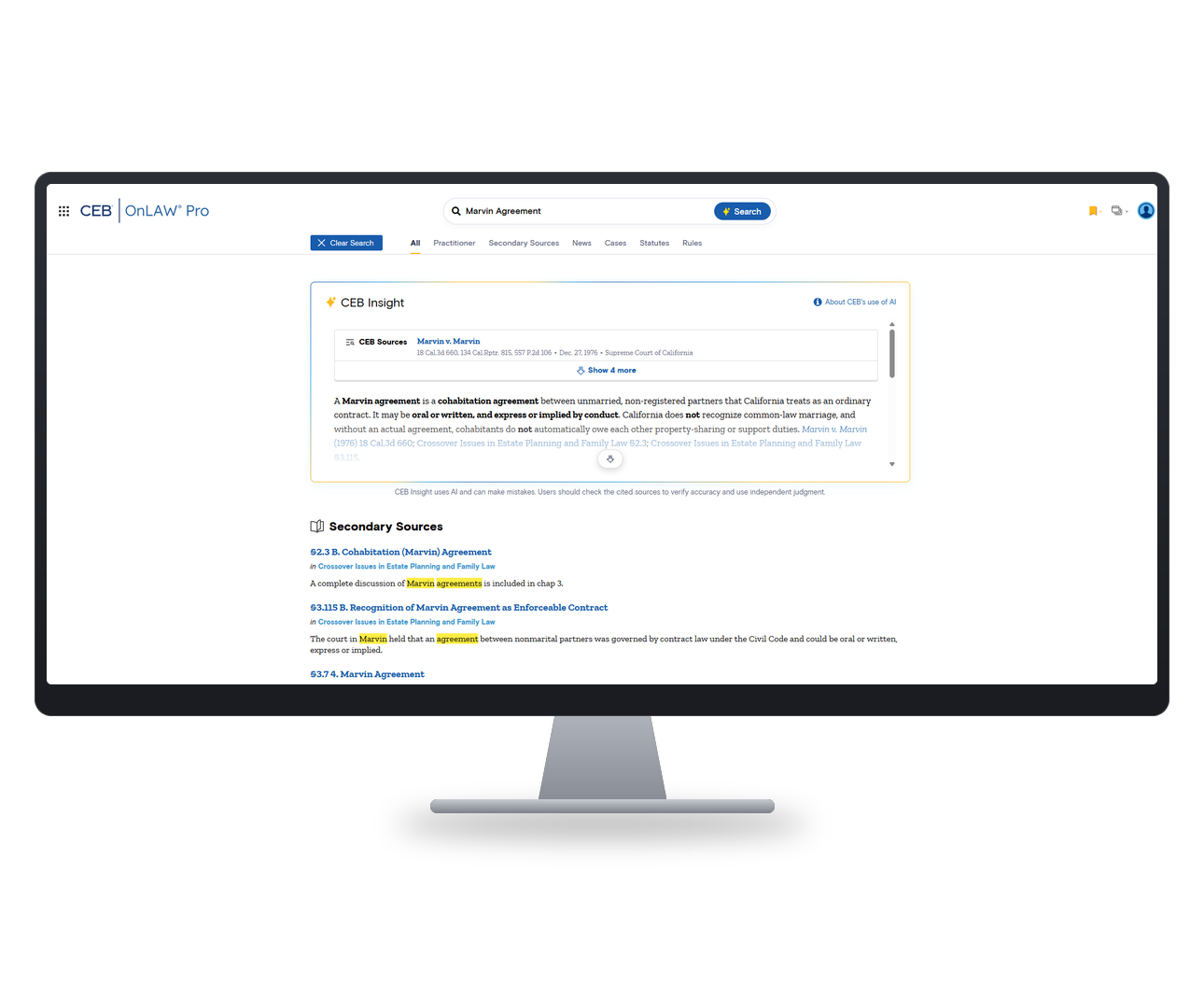
Pinpoint relevant guidance within a Secondary Source
Focus your research within the individual CEB title most relevant to your legal question and move directly to the sections containing the guidance you need.
With the refreshed Secondary Source experience, you can:
- Search within an individual Secondary Source title.
- See how many sections within the title contain your search terms.
- Open a relevant chapter or section with those terms highlighted in the text.
- Navigate a focused table of contents for the title you are viewing.
- Follow active-section highlighting as you move through a publication.
- Expand, narrow or close the navigation panel to balance context with reading space.
Connect your research to practical next steps
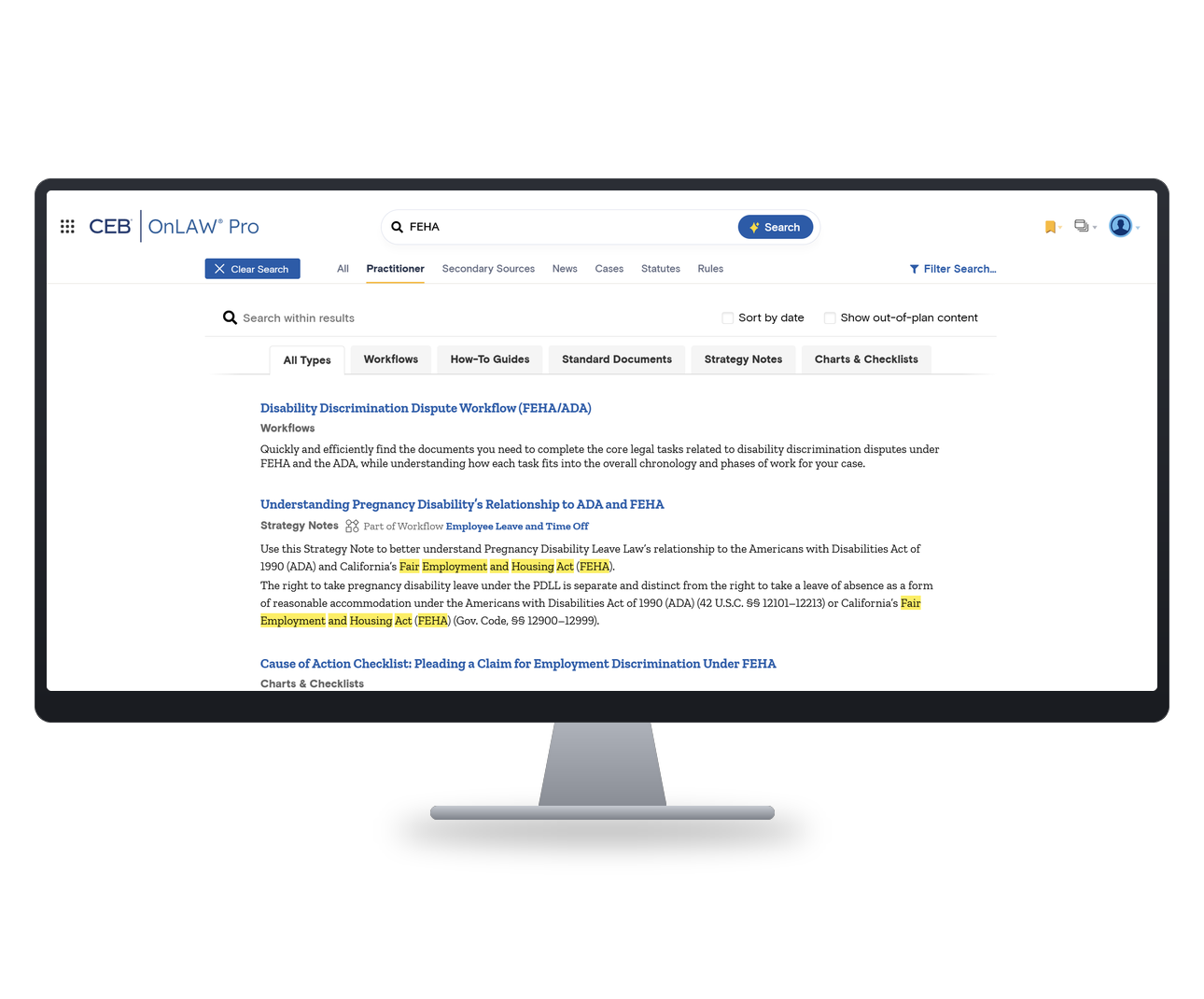
The refreshed Practitioner experience makes it easier to find workflows, forms, checklists, how-to guidance and other practical resources, and understand how each one supports the broader legal task.
With Practitioner, you can:
- Browse practical guidance through a clearer practice-area structure.
- Filter resources by type, including how-to guides, standard documents, strategy notes, charts and checklists.
- See which workflows include an individual document.
- Scan the resources included throughout a complete workflow.
- Follow clearer navigation as you move from a practice area to a workflow or document.
- Save frequently used documents as Favorites and return to them more easily.
If Practitioner is not currently included in your subscription, you may see practical resources related to your research, along with clearer information about what they provide and how to learn more.


Get additional practical perspective with CEB Insight
CEB Insight can now draw on premium Practitioner content, including procedural guidance, strategy notes, how-to guides and standard templates, alongside Secondary Sources and primary law.
By incorporating this practical, step-by-step guidance, CEB Insight can provide additional perspective and nuance to help you move from a legal question toward the next step.
Work with greater clarity and control
Updates across the OnLAW Pro and Practitioner experience help you stay oriented and tailor the reading environment to the way you work.
You can:
- Read documents with improved typography and more consistent presentation.
- Adjust font size and text spacing for your screen and preferences.
- Bookmark useful guidance without returning to the top of the document.
- Maintain context through clearer breadcrumbs and location cues.
- Return to previously expanded practice areas without recreating your browsing path.
A clearer path through the California guidance you trust
Sign in to explore the refreshed OnLAW Pro and Practitioner experience and discover new ways to find, understand and use CEB’s authoritative California content.
Questions about the refreshed experience or the resources included in your subscription? Contact Sales →
Frequently Asked Questions
Is my subscription or pricing changing?
No. This release does not change your existing subscription, access or pricing. You will continue to have access to the content included in your current subscription.
Do I need to do anything before the release?
No action is required. You can sign in as usual after the release. Resources will be available to help you become familiar with the refreshed experience.
Why is CEB refreshing the experience?
We are making these changes to help you find, navigate and use CEB’s authoritative California legal research and practical guidance more easily. The goal is to give you a clearer path from your legal question to the authority and practical resources that can help you move your work forward.
I already know how to use OnLAW Pro. Why change it?
We understand that changes to a familiar experience can require some adjustment. The refreshed experience is designed to reduce the effort required to find relevant guidance, stay oriented within longer publications and connect your research to practical resources.
If I can see Practitioner content, is it now included in my subscription?
Not necessarily. You may see relevant Practitioner resources and clearer information about what they provide, but your ability to open and use that content still depends on your subscription.
Greater visibility into Practitioner is intended to help you understand what a resource contains and how it relates to your research. If it addresses a need in your practice, contact your CEB representative to learn more.
What is the difference between OnLAW Pro and Practitioner?
OnLAW Pro helps you find and understand the California law governing a matter. Practitioner helps you apply that law through workflows, forms, checklists, drafting resources and step-by-step practical guidance. The two experiences are designed to work together, but access to Practitioner depends on your subscription.
Who receives the expanded CEB Insight capability?
The expanded capability is available to Practitioner Unlimited customers. With Practitioner Unlimited, CEB Insight can draw on premium Practitioner content in addition to Secondary Sources and primary law.
How does Practitioner content enhance CEB Insight answers?
Practitioner includes procedural guidance, strategy notes, how-to guides and standard templates. When those resources are relevant to your question, CEB Insight can use them to provide additional practical perspective and nuance beyond an answer informed by primary law and Secondary Sources alone.
I have Practitioner. Why don’t I receive the expanded CEB Insight capability?
The expanded CEB Insight capability is included with Practitioner Unlimited. If you have standard Practitioner, you will still receive the refreshed navigation, workflow, document and usability improvements included in this release.
If you are interested in CEB Insight answers informed by Practitioner content, contact your CEB representative to learn more about Practitioner Unlimited.
Is CEB Insight replacing traditional legal research?
No. CEB Insight gives you an additional way to ask questions and discover relevant CEB content. You can review the supporting sources and move into the underlying primary law, Secondary Sources and, when included in your subscription, Practitioner guidance.
What if I need help adjusting to the refreshed navigation?
We understand that it can take time to adjust to a refreshed experience. Resources will be available to help you find the most direct paths for the tasks you perform most often.
Where can I get help learning the refreshed experience?
Contact your CEB representative or the CEB support team for assistance and additional resources to help you become familiar with the refreshed experience.